
- Zoho Development
Workflow automation in 2026: how Zoho Flow eliminates manual work and improves efficiency
- AssistFlex Team
As businesses grow, so do their processes. What may have started as a handful of manual tasks quickly evolves into hundreds of repetitive activities performed across multiple systems every day. Employees spend valuable time updating records, transferring information between applications, sending notifications, creating tasks, and managing approvals.
While these activities are necessary, they often consume time that could be spent on higher-value work. This is why workflow automation has become one of the most important business trends in recent years.
Organizations worldwide are looking for ways to streamline operations, reduce manual effort, improve accuracy, and scale efficiently. Zoho Flow has emerged as a powerful solution that enables businesses to connect applications and automate workflows without complex development. By eliminating repetitive tasks and enabling systems to communicate seamlessly, Zoho Flow helps organizations operate more efficiently and focus on growth.
The hidden cost of manual processes
Many businesses underestimate the impact of repetitive administrative work. Consider a common scenario: a potential customer submits a contact form on a website. An employee then reviews the submission, creates a lead in the CRM, sends a notification to sales, assigns a follow-up task, updates a spreadsheet, and sends a confirmation email. While each step may only take a few minutes, these processes add up significantly over time. Manual workflows often lead to:
Lost productivity
Employees spend hours performing repetitive tasks instead of focusing on strategic activities.
Increased human error
Data entry mistakes and missed updates can affect customer experiences and operational performance.
Slower response times
Customers expect fast responses, and manual processes can create delays.
Inconsistent processes
Different employees may follow different procedures, resulting in operational inconsistencies. Automation helps solve these challenges.
What is Zoho Flow?
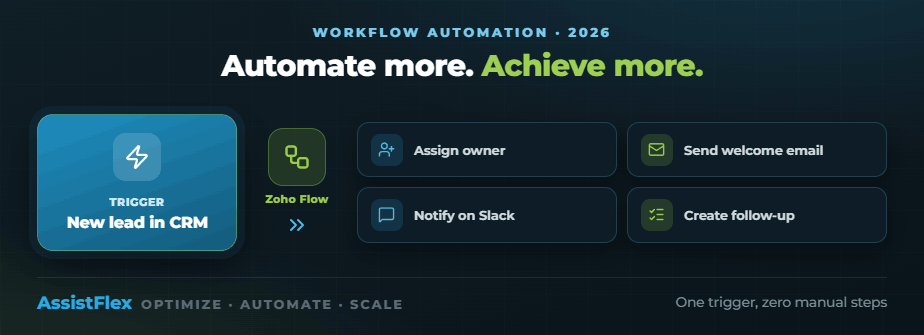
Zoho Flow is a workflow automation and integration platform that connects applications and automates business processes. Think of it as a bridge between your business systems. Instead of employees manually moving information between platforms, Zoho Flow enables applications to exchange information automatically. For example, when a new lead enters Zoho CRM:
- A task can be created automatically
- A sales representative can be assigned
- A welcome email can be sent
- A Slack notification can be triggered
- A follow-up sequence can begin
All without human intervention.
Why workflow automation matters in 2026
Businesses today operate in increasingly complex digital environments. Organizations often use CRM systems, accounting software, marketing platforms, customer support tools, project management applications, and communication platforms. Without integration, teams spend considerable time moving information between systems. Workflow automation eliminates these silos and creates connected business processes — the result is greater efficiency, accuracy, and scalability.
Key features of Zoho Flow
No-code workflow builder
Zoho Flow offers a visual drag-and-drop interface that makes automation accessible to both technical and non-technical users. Businesses can create workflows without writing extensive code, which accelerates implementation and reduces dependency on developers.
Multi-application integration
Zoho Flow supports integrations with hundreds of applications, including:
- Zoho CRM
- Zoho Books
- Zoho Desk
- Zoho Projects
- Google Workspace
- Microsoft 365
- Slack
- Shopify
- Mailchimp
- QuickBooks
This enables businesses to connect critical systems across departments.
Conditional logic
Not every workflow follows the same path. Zoho Flow allows businesses to create intelligent automations based on specific conditions. For example, if a deal value exceeds a certain threshold, it can notify management, create an approval process, and assign additional resources. This flexibility ensures workflows align with business requirements.
Real-time automation
Events can trigger workflows instantly — new customer registrations, form submissions, invoice creation, ticket escalations, and project updates. Real-time automation improves responsiveness and operational efficiency.
Workflow monitoring
Businesses can track workflow performance, identify issues, and optimize processes over time. This visibility ensures automation delivers consistent results.
Real-world automation use cases
Lead management automation
One of the most common automation opportunities involves sales processes. When a lead is generated, Zoho Flow can create a CRM record, assign ownership, send a welcome email, schedule follow-up tasks, and notify the sales team — ensuring no opportunities are missed.
Customer onboarding
Customer onboarding often involves multiple departments. Zoho Flow can automate project creation, welcome communications, team notifications, task assignments, and documentation requests, creating a seamless onboarding experience.
Customer support automation
Support teams can automate ticket creation, priority assignment, escalation workflows, customer updates, and resolution notifications — improving service quality and response times.
Finance process automation
Finance departments can automate invoice generation, payment notifications, expense approvals, accounting updates, and financial reporting, reducing administrative workload while improving accuracy.
Human resources workflows
HR teams can streamline employee onboarding, leave approvals, performance reviews, policy acknowledgments, and employee notifications — improving employee experiences while reducing manual administration.
Benefits of Zoho Flow
Increased productivity
Employees spend less time on repetitive tasks and more time on meaningful work.
Reduced errors
Automated processes minimize data entry mistakes and inconsistencies.
Faster response times
Customers receive quicker responses and better service experiences.
Improved collaboration
Connected systems improve communication across departments.
Greater scalability
Businesses can handle increased workloads without significantly increasing headcount.
Better visibility
Organizations gain greater insight into operational processes and performance.
Workflow automation and digital transformation
Digital transformation is not just about implementing software — it’s about improving how work gets done. Workflow automation plays a critical role in helping organizations eliminate inefficiencies, improve customer experiences, increase agility, and support growth initiatives. As businesses continue adopting cloud-based platforms, automation will become increasingly important, and organizations that automate effectively gain a significant competitive advantage.
How AI is enhancing workflow automation
Artificial intelligence is taking automation to the next level. Modern AI-powered workflows can:
- Analyze customer behavior
- Prioritize tasks
- Predict outcomes
- Generate recommendations
- Trigger intelligent actions
For example, an AI system may identify a high-priority customer inquiry and automatically escalate it to the appropriate team. As AI capabilities evolve, workflow automation will become even more intelligent and proactive.
Is Zoho Flow right for your business?
Zoho Flow is ideal for organizations that:
- Use multiple software applications
- Have repetitive manual processes
- Need better system integration
- Want to improve productivity
- Seek greater operational efficiency
- Plan to scale their operations
Businesses of all sizes can benefit from automation, from startups to large enterprises.
How AssistFlex helps businesses implement Zoho Flow
Frequently asked questions
What is Zoho Flow?
Do I need coding experience to use Zoho Flow?
Can Zoho Flow integrate with non-Zoho applications?
Is workflow automation suitable for small businesses?
Can Zoho Flow support complex workflows?
Final thoughts
Manual processes may seem manageable initially, but they often become barriers to growth as businesses scale. Repetitive tasks consume valuable time, increase operational costs, and create opportunities for error.
Zoho Flow helps organizations overcome these challenges by connecting systems, automating workflows, and streamlining operations. Whether you’re looking to improve sales processes, enhance customer support, automate financial workflows, or optimize internal operations, workflow automation can deliver meaningful business value. As organizations continue their digital transformation journeys, tools like Zoho Flow will play an increasingly important role in building efficient, scalable, and future-ready businesses.
- OPTIMIZE • AUTOMATE • SCALE
Let's get more from your Zoho
Book a free 30-minute consultation and we’ll map your quickest wins — no pressure, no jargon.
- Free, no-obligation call
- Zoho specialists, not generalists
- Reply within one business day